
How to build UberEats with Python/Django and Swift (for iOS) - LEVEL 2
What You'll Learn
Create a Super Admin Dashboard to handle everything as a SaaS
How to build an Authentication process for Restaurants
Hosting the web app LIVE on Heroku
How to program upload and store photos in Cloud
Handle real-time notification when new orders come in
Draw statistic Bar & Pie charts
The process to listen and respond API requests from clients
Visa & Credit card process with Stripe
Build POST & GET API requests between Server and Mobile Clients
Design and organize a mobile app architecture
Handling address location on Google Map
Real-time showing Driver's location
Driver picks an order up for delivery
Weekly Revenue chart on iOS app
Course Details
What are we building?
In this project, I will walk you through the steps to develop apps like UberEats with core functionalities from scratch.You will learn how to build your own system for Food Delivery with Python/Django and Swift (for iOS mobile app).
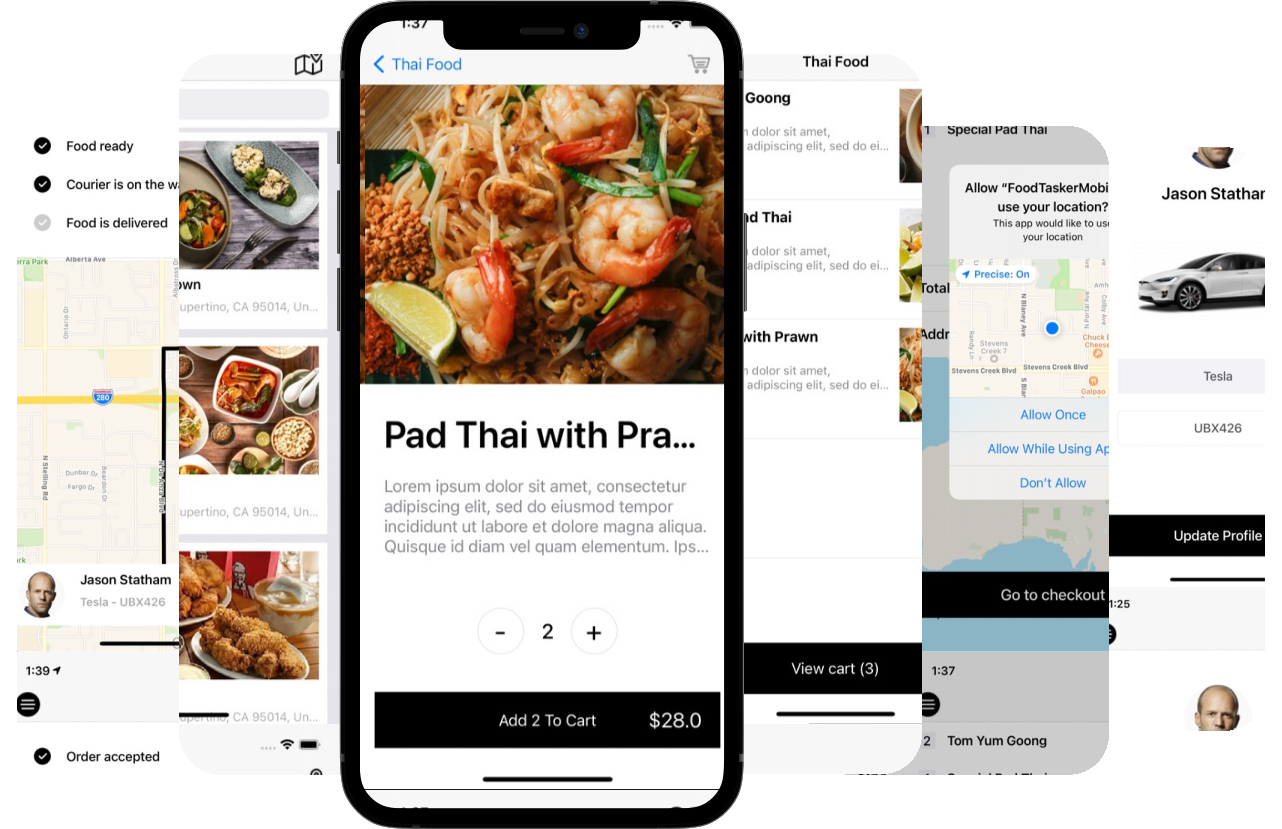
The whole system includes
- Web App for Restaurants [Python]:
Web Application Dashboard for restaurants to register, create Meals and monitor Orders - Mobie App for Customers [Swift]:
Customers use this app to browse, place the order and track the order's status in real-time - Mobile App for Couriers [Swift]:
Couriers/Drivers will use this app to pick up the orders from Restaurant and deliver food to the customers
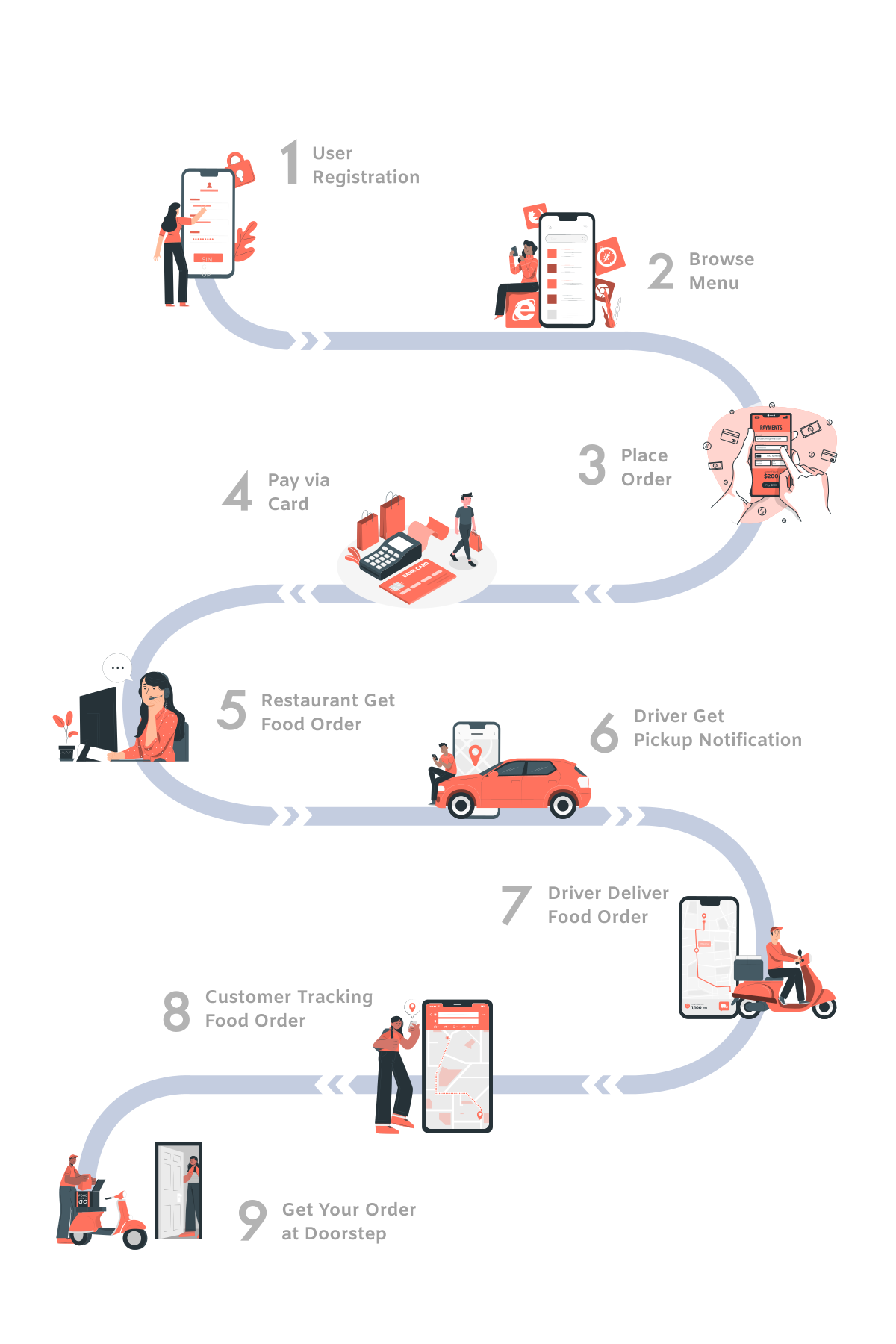
What makes this project so special?
- 2 Programming Languages in 1:
Learning 2 popular & modern programming languages are in high demand in both startups and bigger companies - Python & Swift. - Web app + Mobile app:
There are no other courses in the market that cover both the skills and complexity to build a comprehensive system that has a mobile app working with a web app - Anyone can learn this project:
Newbies without knowledge of coding can definitely take this project as it is designed to cover the foundation of Python & Swift as well as real practical skill sets - Real-life Startup approach:
We've going to clone the idea of UberEats or Doordash but don't limit yourself to that. With the principles, knowledge and programming skills in this project, you are absolutely able to apply what you learned to any business idea - Monetize this project:
This is what we love most! While it is great to add this to your portfolio or CV to attract employers, why don't you just make it a side project that helps your community and make you money!
Preview Lessons
Design Cart Layout
Skeleton Loading View
Floating View Cart Button
Course Curriculum
Module 1 — Designing UI
Create Your First Xcode Project
9:21
Design Login Layout
8:54
Design Side Menu Layout
13:23
Design Restaurants Layout
12:59
View Controller for Restaurants
8:43
Design Meal List Layout
12:16
Design Meal Details Layout
13:37
Design Cart Layout
15:08
View Controller for Cart
6:15
Design Checkout Layout
16:49
Design Delivery Layout
14:23
Module 2 — Connecting to Facebook
Setting Facebook with iOS
8:59
Connect to Facebook
14:23
Getting Facebook User Profile
16:13
Logging out from Facebook
7:59
Module 3 — Connecting to Server via APIs
Create API Manager
12:44
Create Authentication APIs
10:36
Authentication with Test Users
13:34
Module 4 — Restaurants List
Restaurants List API
9:15
Restaurant Model
11:05
Restaurant Cell
16:58
Search Bar Function
6:14
Skeleton Loading View
10:24
Module 5 — Restaurant Menu
Meals List API
5:35
Meal Model and Cell
9:37
Display Meals List
7:32
Utils
3:29
Module 6 — Menu Meal Details
Display Meal Details
7:44
Quantity Buttons in Meal
7:14
Cart Business Logic - Part 1
15:00
Cart Business Logic - Part 2
16:14
Cart with Badge
18:22
Floating View Cart Button
12:28
Module 7 — Shopping Cart
Cart Business Logic
10:22
Display Meals on Cart
12:14
Location on Map
8:39
Addresses on Map
6:42
Module 8 — Checkout Payment
Checkout View
13:19
Checkout Process
20:38
Display Order Status
11:24
Show Location on the Map
17:50